
Introduction
The manufacturing industry is evolving rapidly. With increasing competition, rising raw material costs, complex supply chains, and growing customer demands, manufacturers today need more than just machines and manpower — they need smart digital tools to survive and thrive.
This is where Manufacturing ERP Software comes into the picture. It's not just software — it's a complete digital backbone that connects every department, every process, and every data point in your manufacturing business into one intelligent platform.
According to industry research, manufacturers who implement ERP systems experience an average of 22% reduction in operational costs, 20% improvement in production efficiency, and 35% better inventory accuracy.
In this comprehensive guide by ACGIL, we'll cover everything you need to know about manufacturing ERP software — what it is, how it works, key features, benefits, how to choose the right one, implementation tips, costs, and the latest trends for 2026. Whether you're a small job shop or a large-scale manufacturing enterprise, this guide will help you make an informed decision.
Let's dive in. 👇
What is Manufacturing ERP Software?
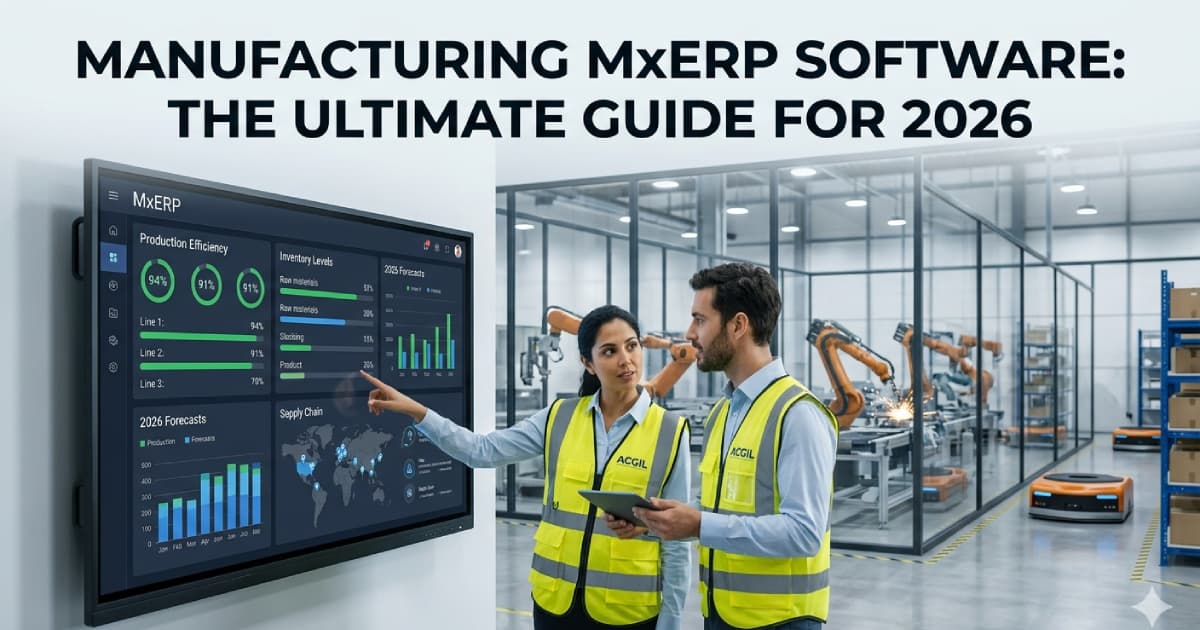
Manufacturing ERP (Enterprise Resource Planning) software is a specialized business management system designed specifically for manufacturing companies. It integrates all core business processes — from procurement and production planning to inventory management, quality control, finance, and sales — into a single unified digital platform.
Unlike generic ERP software that serves multiple industries, a manufacturing ERP is purpose-built with features that address the unique challenges of the manufacturing sector. It includes specialized modules like:
- Bill of Materials (BOM) management
- Material Requirements Planning (MRP)
- Production scheduling and work order management
- Shop floor control and monitoring
- Quality management and compliance tracking
- Inventory management with batch/lot tracking
- Supply chain management
- Financial accounting with product costing
Manufacturing ERP vs. Generic ERP — What's the Difference?
| Aspect | Generic ERP | Manufacturing ERP |
|---|---|---|
| Industry Focus | Multi-industry (retail, services, etc.) | Exclusively manufacturing |
| BOM Management | Basic or absent | Multi-level BOM with version control |
| MRP Engine | Not available | Full MRP with net requirement calculation |
| Shop Floor Control | Not available | Real-time machine & operator tracking |
| Production Planning | Limited | Advanced scheduling with capacity planning |
| Quality Management | Basic | Multi-stage QC with CAPA & compliance |
| Costing | Standard accounting | Product costing (BOM-based + labor + overhead) |
| Batch/Lot Tracking | Limited | Full traceability with expiry management |
If you're a manufacturer, a generic ERP will leave critical gaps. You need a purpose-built manufacturing ERP system that speaks your language — production, BOM, MRP, shop floor, and quality.
How Does Manufacturing ERP Software Work?
Manufacturing ERP software works by creating a centralized digital ecosystem where all departments share real-time data through interconnected modules.
Step-by-Step Workflow of Manufacturing ERP
- Sales Order Received - A customer places an order. The sales management module captures the order details, delivery date, and specifications. The order is automatically linked to production planning.
- BOM & Routing Generated - Based on the product ordered, the ERP pulls the Bill of Materials (BOM) - listing all raw materials, sub-assemblies, and quantities needed. The routing defines the sequence of operations, work centers, and time required.
- MRP Calculates Requirements - The Material Requirements Planning (MRP) engine checks current inventory levels, calculates net requirements, and automatically generates purchase orders for materials that need to be procured and production orders for items to be manufactured.
- Procurement & Material Receipt - The purchase management module sends purchase orders to vendors. When materials arrive, they go through goods receipt and incoming quality inspection before being added to inventory.
- Production Execution - Production orders are released to the shop floor. The shop floor control module tracks each operation - machine assignment, operator allocation, start/end times, and in-process quality checks. Materials are automatically consumed from inventory as production progresses.
- Quality Inspection - Finished goods undergo final quality inspection. Non-conforming items are flagged, and Corrective & Preventive Actions (CAPA) are initiated. Only approved items move to finished goods inventory.
- Dispatch & Invoicing - The sales module creates dispatch orders, generates GST invoices, e-way bills, and delivery challans. The accounting module automatically records revenue and updates financial reports.
- Reporting & Analytics - Throughout this entire process, every data point is captured. The ERP generates real-time dashboards, reports, and analytics - production efficiency, cost analysis, inventory health, profitability, and more.
This seamless flow of information is what makes manufacturing ERP software so powerful. There are no data silos, no manual data entry between departments, and no delays in information flow.
Key Features of Manufacturing ERP Software
Not all manufacturing ERP systems are created equal. When evaluating options, look for these must-have features that truly make a difference on the shop floor and in the boardroom. Here are the 15 essential features every manufacturing ERP should have:
- Production Planning & Scheduling - The heart of any manufacturing ERP. This feature enables you to plan production runs, schedule operations across work centers and machines, allocate resources, and manage production timelines. Advanced systems offer Gantt chart-based visual scheduling, drag-and-drop rescheduling, and automatic capacity balancing.
- Bill of Materials (BOM) Management - Create and manage multi-level Bills of Materials with unlimited levels. Track raw materials, sub-assemblies, components, and their quantities. Support for BOM versioning, engineering change management, and substitute materials ensures accuracy throughout the production process.
- Material Requirements Planning (MRP) - The MRP engine automatically calculates what materials you need, how much you need, and when you need them — based on production schedules, current inventory, safety stock levels, and supplier lead times. This eliminates both stockouts and overstocking.
- Shop Floor Control - Real-time monitoring of shop floor activities — machine status, operator assignments, job progress, downtime tracking, and production output. This feature provides complete visibility into what's happening on the factory floor at any given moment.
- Inventory & Warehouse Management - Comprehensive inventory management with real-time stock tracking across multiple locations and warehouses. Support for batch/lot tracking, serial numbers, barcode/QR scanning, FIFO/LIFO costing, shelf life management, and auto-reorder points.
- Quality Control & Management - Built-in quality management with inspection checkpoints at incoming, in-process, and final stages. Define quality parameters, manage non-conformances, initiate CAPA, and maintain compliance with standards like ISO 9001, GMP, and FDA.
- Supply Chain Management - End-to-end supply chain management from vendor selection and purchase orders to goods receipt and vendor performance evaluation. Streamline procurement, reduce lead times, and build stronger supplier relationships.
- Financial Accounting & Costing - Integrated financial accounting with product costing that includes material costs, labor costs, and manufacturing overheads. GST compliance, e-invoicing, accounts payable/receivable, and comprehensive financial reporting.
- Sales & Order Management - Sales management from quotation to dispatch. Track customer orders, manage pricing, generate invoices, coordinate with production, and ensure on-time delivery.
- Purchase & Procurement Management - Purchase management with vendor comparison, RFQ management, purchase order automation, approval workflows, and goods receipt notes (GRN). Optimize procurement costs and ensure timely material availability.
- Work Order Management - Create, assign, and track work orders throughout the production lifecycle. Each work order carries complete information — BOM, routing, materials, operations, quality checkpoints, and costing — providing end-to-end production traceability.
- Capacity Planning - Analyze and optimize the capacity of your machines, work centers, and workforce. Identify bottlenecks before they happen, plan for peak demand periods, and make data-driven decisions about capacity expansion.
- Subcontracting / Job Work Management - Manage outsourced manufacturing operations. Track materials sent to subcontractors, monitor job work progress, reconcile returns, and handle job work invoicing with GST compliance — a critical feature for Indian manufacturers.
- HR & Payroll Integration - Integrated HR and payroll management for managing your manufacturing workforce — attendance tracking, shift management, labor cost allocation to production orders, payroll processing, and statutory compliance.
- Business Intelligence & Dashboards - Powerful reporting engine with 100+ pre-built reports and customizable dashboards. KPI tracking, trend analysis, drill-down capabilities, and export options. Make data-driven decisions that improve your manufacturing operations.
Want to see these features in action? Explore ACGIL Manufacturing ERP Software and request a free demo today.
Top 12 Benefits of Manufacturing ERP Software
Implementing a manufacturing ERP software delivers transformational results across your entire business. Here are the 12 most impactful benefits that manufacturers experience after deploying manufacturing ERP software:
- Increased Production Efficiency (Up to 35%) - Automated production scheduling, optimized resource allocation, and real-time shop floor visibility eliminate bottlenecks and reduce idle time.
- Reduced Inventory Costs (20-30% Savings) - With MRP-driven procurement and real-time inventory tracking, you eliminate overstocking and stockouts.
- Better Product Quality & Fewer Defects - Multi-stage quality inspections, automated QC checkpoints, and CAPA management ensure consistent product quality. Manufacturers see 50-60% reduction in defects and rework.
- Real-Time Visibility Across All Departments - No more information silos. A manufacturing ERP gives you a 360-degree real-time view of production status, inventory levels, order status, financial health, and operational KPIs from a single dashboard.
- Faster Order Fulfillment (40% Improvement) - Integrated order-to-delivery workflow eliminates manual handoffs between departments.
- Accurate Product Costing & Better Margins - Know the true cost of every product, batch, and order. Manufacturing ERP tracks material costs, labor costs, machine costs, and overheads.
- Streamlined Supply Chain - Better vendor management, automated purchase orders, and supply chain visibility reduce lead times.
- Regulatory Compliance Made Easy - Built-in GST compliance, e-invoicing, e-way bill generation, and industry-specific compliance support (ISO, GMP, FDA, FSSAI).
- Data-Driven Decision Making - With 100+ reports and analytics dashboards, management can make informed decisions based on real data.
- Reduced Operational Costs (15-25%) - By automating manual processes, eliminating redundancies, optimizing resource utilization.
- Scalability for Business Growth - A good manufacturing ERP grows with your business. Start with the modules you need today, and add more as you expand.
- Improved Customer Satisfaction - On-time delivery, consistent quality, accurate order tracking, and responsive communication all lead to happier customers.
Manufacturing ERP ROI Statistics
- 22% average reduction in operational costs
- 35% improvement in production efficiency
- 25% reduction in inventory costs
- 40% faster order fulfillment
- 50% fewer production defects
- 20% increase in on-time delivery
- ROI achieved within 12-18 months
Types of Manufacturing ERP Systems
Manufacturing ERP software comes in different types based on deployment model and manufacturing process. Understanding these types will help you choose the right ERP for your business.
Based on Deployment Model
| Type | Description | Best For | Pros | Cons |
|---|---|---|---|---|
| Cloud ERP | Hosted on cloud servers, accessed via browser | SMBs, remote teams, multi-location | Low upfront cost, anywhere access, auto-updates | Internet dependent, ongoing subscription |
| On-Premise ERP | Installed on your own servers | Large enterprises, data-sensitive industries | Full control, one-time cost, offline access | High upfront cost, IT maintenance needed |
| Hybrid ERP | Combination of cloud and on-premise | Companies needing flexibility | Best of both worlds, flexible | Complex setup, higher integration effort |
Based on Manufacturing Process Type
| Type | Description | Industries |
|---|---|---|
| Discrete Manufacturing ERP | For producing distinct, countable items with BOM | Automotive, electronics, machinery, furniture |
| Process Manufacturing ERP | For formula/recipe-based production in batches | Food, pharma, chemicals, cosmetics |
| Mixed-Mode ERP | Supports both discrete and process manufacturing | Companies with diverse product lines |
| Make-to-Order (MTO) ERP | Production starts after customer order received | Custom manufacturing, job shops |
| Make-to-Stock (MTS) ERP | Production based on demand forecasting | FMCG, consumer goods, standardized products |
| Engineer-to-Order (ETO) ERP | Custom engineering design before production | Heavy engineering, capital equipment |
ACGIL's manufacturing ERP software supports all deployment models (cloud, on-premise, hybrid) and all manufacturing types (discrete, process, mixed-mode, MTO, MTS, ETO) — giving you maximum flexibility.
Who Needs Manufacturing ERP Software?
If you're in the manufacturing sector, the question isn't "Do I need ERP?" — it's "When should I implement it?". Here are clear signs that your manufacturing business needs an ERP system:
Signs You Need Manufacturing ERP
- You're still using spreadsheets to manage production, inventory, or accounting
- Different departments use different software that don't talk to each other
- You frequently face stockouts or overstock situations
- Production delays are common and hard to diagnose
- You don't know the actual cost of your products
- Quality issues and customer complaints are increasing
- Generating reports takes hours or days instead of minutes
- You're growing and current systems can't keep up
- GST compliance is a manual headache every month
- You have multiple manufacturing locations that need centralized management
If you identified with 3 or more of these signs, it's time to seriously consider implementing a manufacturing ERP solution.
Industries That Benefit Most from Manufacturing ERP
- Automotive & Auto Components
- Pharmaceutical & Life Sciences
- Food & Beverage Processing
- Electrical & Electronics
- Textile & Garment
- Metal Fabrication & Engineering
- Chemical & Paint
- Packaging & Plastics
- Building Materials & Cement
- Aerospace & Defense
- Cosmetics & Personal Care
- Wood & Furniture
How to Choose the Right Manufacturing ERP Software
Choosing the right manufacturing ERP is one of the most important decisions a manufacturing company can make. Here's a step-by-step guide to selecting the best ERP for your manufacturing business:
- Define Your Requirements - Document your specific needs: manufacturing processes, biggest pain points, number of users, deployment preference, budget, integrations (Tally, CRM, e-commerce), and compliance requirements (GST, ISO, GMP).
- Look for Manufacturing-Specific Features - Ensure the ERP has features specifically designed for manufacturing — BOM, MRP, shop floor control, production scheduling, quality management, and product costing.
- Evaluate Vendor Experience in Manufacturing - Choose a vendor who understands the manufacturing industry. Ask for references from existing manufacturing clients, case studies, and industry-specific expertise.
- Request a Live Demo - Never buy an ERP without seeing it in action. Request a live demo with your actual business scenarios.
- Check Customization & Scalability - Your ERP should adapt to your processes — not the other way around. Ensure the vendor offers customization flexibility.
- Evaluate Total Cost of Ownership (TCO) - Look beyond the license fee. Consider implementation costs, customization costs, training costs, annual maintenance, and infrastructure costs.
- Assess Implementation Timeline & Methodology - Ask about the vendor's implementation methodology, timeline, and project management approach.
- Verify Post-Implementation Support - ERP is a long-term investment. Ensure the vendor provides dedicated post-implementation support.
Pro Tip: Don't just compare features on paper. The best ERP is the one that fits YOUR specific manufacturing processes, is within your budget, and is backed by a vendor who provides excellent support.
Manufacturing ERP Implementation Guide
Successful manufacturing ERP implementation requires careful planning, stakeholder buy-in, and the right methodology. Here's how ACGIL implements manufacturing ERP for its clients:
- Phase 1: Discovery & Requirement Analysis (Week 1) - Our ERP consultants visit your manufacturing facility, study your processes end-to-end, interview key stakeholders, and document detailed requirements.
- Phase 2: Solution Design & Configuration (Week 2-3) - Based on the requirements, we configure the manufacturing ERP system — setting up master data, BOM structures, production workflows, quality parameters, user roles, and report templates.
- Phase 3: Data Migration (Week 4) - We migrate your existing data — product masters, BOM data, customer/vendor details, inventory data, and financial opening balances — from your current systems into the new manufacturing ERP.
- Phase 4: Testing & Quality Assurance (Week 5) - Rigorous testing of every module, workflow, integration, and report. We conduct system integration testing (SIT) followed by User Acceptance Testing (UAT) with your team.
- Phase 5: Training & Go-Live (Week 6-7) - Comprehensive training for all user groups — shop floor operators, supervisors, managers, accounts team, and management.
- Phase 6: Post Go-Live Support (Week 8+) - Dedicated support team available after go-live to resolve issues, fine-tune configurations, answer user queries, and ensure smooth operations.
Average Implementation Timeline: 4-8 weeks for SMBs | 8-16 weeks for large enterprises.
How Much Does Manufacturing ERP Cost?
The cost of manufacturing ERP software varies based on several factors:
| Factor | Impact on Cost |
|---|---|
| Number of users | More users = higher cost |
| Number of modules | More modules = higher cost |
| Deployment type | Cloud (subscription) vs On-premise (one-time + infra) |
| Customization level | More customization = higher cost |
| Data migration complexity | Complex legacy data = more effort |
| Integration requirements | External integrations add cost |
| Training requirements | More users & locations = more training |
| Support & maintenance | Annual maintenance contract costs |
Cost-Saving Tip: Don't overbuy modules you don't need right now. Start with core modules (production, inventory, accounting) and add more modules as your needs evolve.
Common Challenges & How to Overcome Them
While manufacturing ERP software delivers tremendous value, implementation and adoption come with challenges. Here are the most common challenges and their solutions:
- Resistance to Change - Involve key users early in the selection process. Provide comprehensive training. Show them how the ERP makes their job easier.
- Data Migration Issues - Invest time in data cleansing before migration. Work with your ERP vendor to validate data. Start with clean master data.
- Scope Creep - Freeze requirements before implementation begins. Use a phased approach — implement core modules first, then add enhancements.
- Choosing the Wrong ERP - Always choose a manufacturing-specific ERP. Evaluate based on feature fit, not brand size. Request demos with your actual business scenarios.
- Insufficient Training - Invest in thorough, role-based training. Provide user manuals and video tutorials. Designate "ERP champions" in each department.
- Unrealistic Expectations - Set realistic timelines and expectations. ERP benefits compound over time. Focus on adoption first, optimization second.
Manufacturing ERP Trends in 2026
The manufacturing ERP landscape is evolving rapidly. Here are the top trends shaping the future of ERP for manufacturing in 2026 and beyond:
- AI & Machine Learning Integration - Manufacturing ERPs are incorporating AI-powered features like demand forecasting, predictive maintenance, quality prediction, and intelligent scheduling.
- Cloud-First ERP Adoption - More manufacturers are moving to cloud-based ERP for its flexibility, lower costs, and remote accessibility.
- IoT & Industry 4.0 Integration - Internet of Things (IoT) devices on the shop floor connect directly to the ERP, providing real-time machine data and production counts.
- Mobile ERP Access - Manufacturers need ERP access on the go — on tablets and smartphones. Mobile ERP apps enable shop floor data capture.
- Low-Code/No-Code Customization - Modern ERPs are offering low-code platforms that allow manufacturers to customize workflows without deep technical expertise.
- Sustainability & ESG Tracking - Manufacturers are increasingly required to track and report on sustainability metrics — carbon footprint, waste management.
- Enhanced Cybersecurity - ERP systems are enhancing data encryption, role-based access, multi-factor authentication, and compliance with data protection regulations.
ACGIL continuously evolves its manufacturing ERP software to incorporate these emerging trends, ensuring our clients always stay ahead of the curve.
Real-World Success Story
Client Profile: Auto Parts Manufacturing | Gurugram, Haryana | 200+ employees, 2 manufacturing plants | 45 users | ACGIL Manufacturing ERP Software
Challenges Before ACGIL MxERP
- Production planning done on spreadsheets — constant errors
- No real-time inventory visibility across 2 plants
- Manual quality tracking leading to customer complaints
- Costing was approximate — no idea of actual margins
- GST filing was a monthly nightmare
- Management had no real-time reports or dashboards
Results After 12 Months
| Metric | Before ACGIL ERP | After ACGIL ERP | Improvement |
|---|---|---|---|
| Production Efficiency | 62% | 88% | +26% |
| Inventory Accuracy | 70% | 98% | +28% |
| On-Time Delivery | 72% | 95% | +23% |
| Quality Rejection Rate | 8% | 2.5% | -5.5% |
| Monthly Closing Time | 12 days | 3 days | -9 days |
| Operational Cost Reduction | - | - | 18% saved |
"ACGIL's manufacturing ERP has been a game-changer for us. We now have complete visibility into our production, real-time costing, and GST compliance is fully automated."
Manufacturing ERP Selection Checklist
Use this checklist when evaluating manufacturing ERP software vendors. Print it out, score each vendor, and make a data-driven decision:
- Is the ERP specifically designed for manufacturing?
- Does it support your manufacturing type (discrete/process/mixed)?
- Does it have multi-level BOM management?
- Does it include MRP functionality?
- Does it offer shop floor control & monitoring?
- Does it include quality management (QC/CAPA)?
- Does it support GST, e-invoicing, e-way bill?
- Is it available on both cloud and on-premise?
- Can it be customized to your specific processes?
- Does the vendor have manufacturing industry experience?
- Is the implementation timeline acceptable (< 8 weeks)?
- Is the total cost within your budget?
- Does the vendor provide post-implementation support?
- Can you see a live demo with your scenarios?
- Are there positive client references/testimonials?
- Does it offer mobile access?
- Does it support multi-plant/multi-location?
- Does it integrate with your existing software (Tally, CRM)?
- Is the user interface intuitive and easy to learn?
- Does the vendor offer training & documentation?
Score each vendor out of 20. ACGIL Manufacturing ERP checks on all 20 criteria.
Frequently Asked Questions
What is the difference between ERP and Manufacturing ERP?
A generic ERP system manages basic business processes like accounting, HR, and sales across any industry. A manufacturing ERP is a specialized ERP that includes manufacturing-specific features like production planning, BOM management, MRP, shop floor control, quality management, and product costing — features that generic ERPs lack.
Is Manufacturing ERP suitable for small businesses?
Absolutely! Modern manufacturing ERP solutions like ACGIL are designed to be affordable, easy to implement, and scalable for small manufacturing businesses. In fact, small manufacturers often see the fastest ROI because they're replacing manual/spreadsheet-based processes.
How long does Manufacturing ERP implementation take?
ACGIL's manufacturing ERP implementation typically takes 4-8 weeks for SMBs and 8-16 weeks for large enterprises. Compare this to enterprise ERPs like Microsoft or Oracle which can take 6-18 months.
What is MRP in Manufacturing ERP?
MRP (Material Requirements Planning) is a core module in manufacturing ERP that calculates the exact materials needed for production based on BOM, production schedule, current inventory levels, and supplier lead times.
Can Manufacturing ERP integrate with Tally?
Yes, many manufacturing ERPs including ACGIL offer integration with Tally for financial accounting. However, most manufacturers find that the built-in accounting module in the ERP is sufficient and eliminates the need for a separate Tally license.
Is Cloud Manufacturing ERP secure?
Yes, reputable cloud ERP providers use enterprise-grade security including SSL encryption, data encryption at rest, multi-factor authentication, regular backups, and SOC-compliant data centers.
What is the ROI of Manufacturing ERP?
Most manufacturers achieve positive ROI within 12-18 months of ERP implementation. ROI comes from reduced inventory costs (20-30%), improved production efficiency (25-35%), fewer defects (50-60% reduction), and reduced operational costs (15-25%).
Can I implement Manufacturing ERP in phases?
Yes, and we actually recommend it! Start with core modules (production, inventory, accounting) in Phase 1, then add supply chain, HR/payroll, and advanced analytics in Phase 2.
Does ACGIL ERP support multi-plant manufacturing?
Yes! ACGIL's manufacturing ERP supports multi-plant, multi-warehouse, and multi-company operations within a single system.
How do I get started with ACGIL Manufacturing ERP?
Getting started is easy! Contact our team to schedule a free consultation and demo. Our ERP experts will understand your requirements, show you a live demo with your business scenarios, and provide a customized proposal — all at no cost and no obligation.
Conclusion: Why Manufacturing ERP Software is No Longer Optional
In 2026, manufacturing ERP software isn't a luxury - it's a necessity. The manufacturers who embrace digital transformation through ERP will lead their markets. Those who don't will struggle with inefficiencies, rising costs, quality issues, and an inability to compete.
Whether you're a small job shop with 10 employees or a large manufacturer with multiple plants, the right manufacturing ERP system can transform your operations - making you more efficient, more profitable, and more competitive.
Key Takeaways from This Guide:
- Manufacturing ERP is purpose-built for manufacturers — don't settle for a generic ERP
- Essential features include BOM, MRP, production planning, shop floor control, quality management, and product costing
- Benefits include 35% improved efficiency, 25% lower inventory costs, and 40% faster delivery
- Choose a vendor with manufacturing expertise, affordable pricing, and strong support
- Implementation takes 4-8 weeks with the right vendor and methodology
- ROI is typically achieved within 12-18 months
- Start with core modules and scale as you grow
ACGIL has been helping manufacturers across India transform their operations with powerful, affordable, and easy-to-use manufacturing ERP software for over 30+ years.
Ready to Transform Your Manufacturing Operations?
Take the first step toward smarter manufacturing. Get a free, no-obligation consultation and live demo of ACGIL Manufacturing ERP Software.
📞 Call Us: +91–9818993537
📧 Email: akg@acgil.net
🌐 Visit: Manufacturing ERP Software Page
📝 Request Demo: Contact ACGIL